
Renew your Xtreme HD IPTV subscription
How to renew your Xtreme HD IPTV subscription?
Renewing your current subscription is a walk in the park. No need to login or store information. Simply check your expiry date and follow the steps below. Need help? Contact Us
For the best 4K experience, please check your internet connection on Speedtest.net

How to Renew
Step-by-step Instructions
Step 1
Place a new order on the site.
Step 2
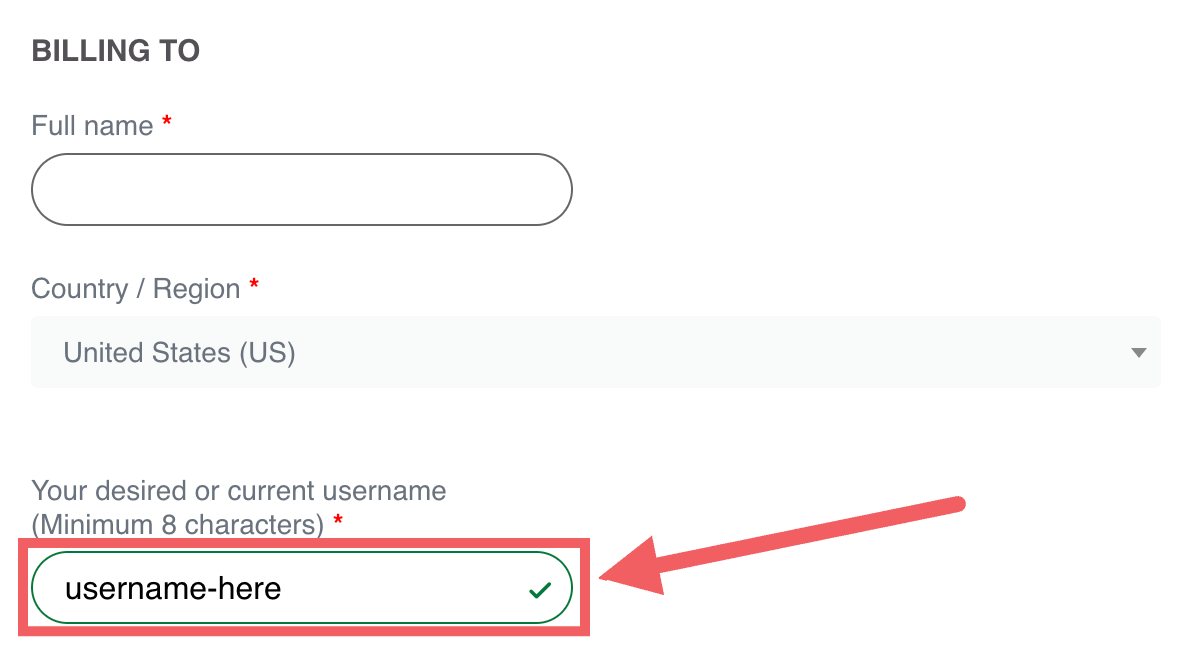
Enter your current username.
Step 3
Pay & wait for renewal activation.
Step 4
Restart your Device/App.
How does it work?
Renewing your Xtreme HD IPTV subscription doesn’t have to be a lot of hassle, we hope the step-by-step instructions above are easy to follow and understand.
Since we don’t auto-charge your credit card or payment method, we can’t auto-renew your Xtreme HD IPTV subscription, which means you will have to manually renew your account when it’s near expiration.
But don’t worry, this is a smooth process for both you (the customer) and for us (the IPTV provider), you only need to place a new order and enter your current username in checkout page, and then we will process your order and re-activate your subscription, and we will let you know, so you will only need to refresh your device or app to see the new expiration date (show in your app home screen).
Why renew your Xtreme HD IPTV subscription?
Here is what you'll be missing on if you don't renew...
- Lag-free Live TV Streaming
- Free VOD Android App
- Multiple customer support channels
- Works with any device/app
- Multi-screen viewing
- Parental Control & No-Adult Content
- 12,000+ Premium Channels
- 100,000+ Movies & Series
- Sports, PPV & Global Channels
- Favorite channels tab
- Multi-language movie subtitles
- Multiple payment options (CC, Crypto, etc)

